Any agent can now build with Terminal over MCP
Add Terminal's MCP server to your agent and sign in, with no AI key. Agents build natively and can now run clients, the CRM, stores and go-live steps.
 The Stacklumen team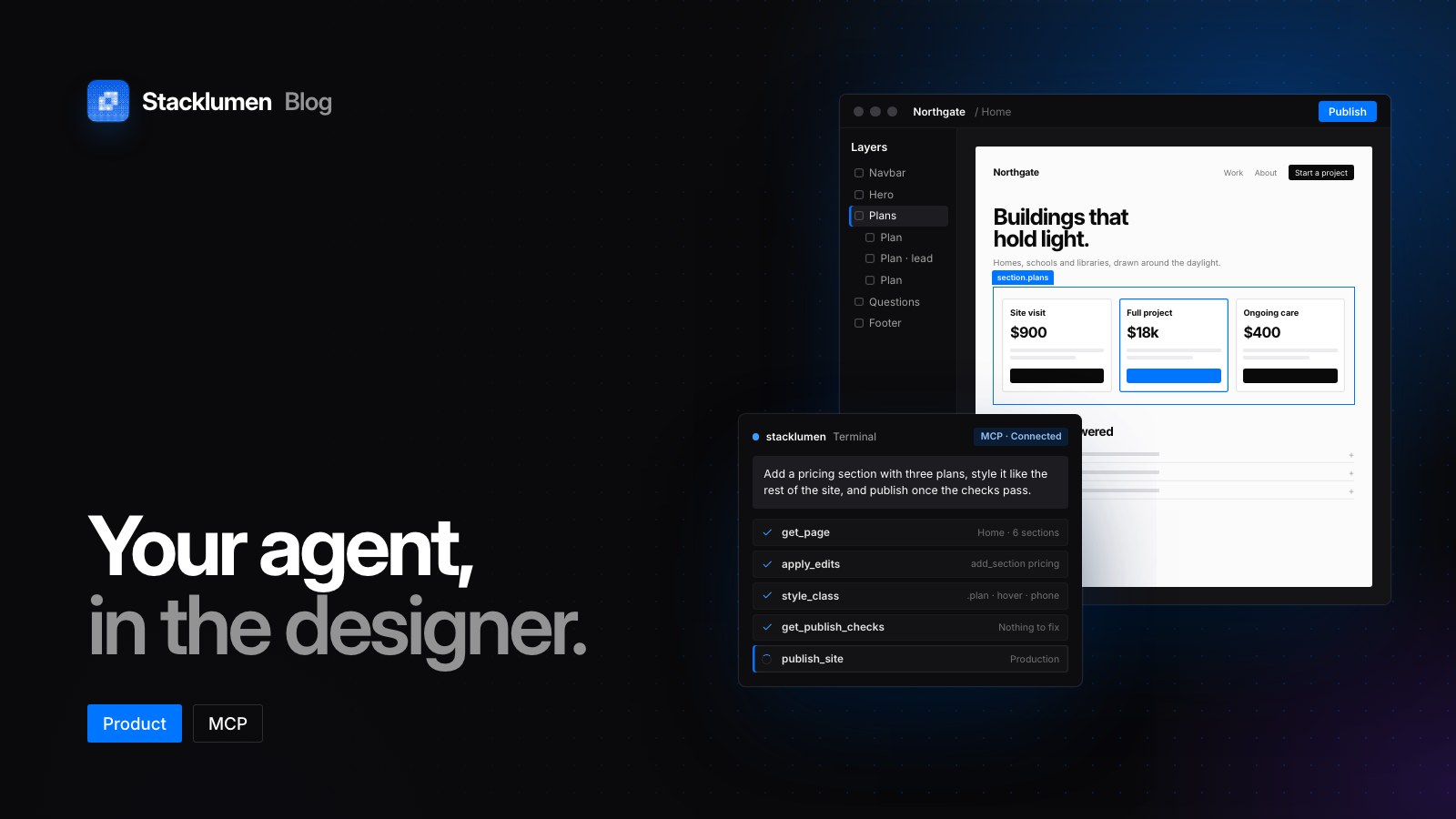
On this page
For agencies that work with an agent, Terminal's MCP server now reaches past their sites into clients, the CRM, projects and stores. An agent you already use, such as Claude, Claude Code or Codex, connects by signing in with your Stacklumen account, with no AI provider key. The server has 160 tools; since 21 October they also cover client approvals, public profiles and going live, and workspace admins can run agents as owners do.
Connecting takes three steps
Any agent that can add a remote MCP server and sign in connects the same way:
- Copy the server URL:
https://www.stacklumen.com/terminal/api/mcp - Add it to your agent as a remote MCP server or connector.
- Sign in with your Stacklumen account when the agent asks, and allow access.
The agent runs on your own AI plan, so we bill nothing for model use. Connecting is free on every plan, and the agent meets your plan's limits as a person would.
Workspace owners and admins can connect agents; members, viewers and client guests cannot. A signed-in agent acts as the person who allowed it, with their role. In StackIDE, our desktop app in private alpha, a synced site folder's .mcp.json already names the server, so an agent started there only signs in.
Signing in and API keys do similar work for different callers
A signed-in agent and an API key both act as a person, within that person's role and the permissions chosen, but they serve different callers and are set up differently.
- A signed-in agent is for an agent someone works with. It connects with the three steps above, you approve its permissions on a consent screen, and
switch_workspacemoves it between the workspaces you run as an owner or admin. - An API key is for a script, a CI job or a tool that cannot sign in. An owner or admin makes it on Agents & API with a reach (the whole workspace or one site), an expiry (90 days by default) and permissions, ticked one by one or from a preset such as Read only. It is shown once, sent as a bearer token in the
Authorizationheader, and acts as the person who made it, in the workspace it was made in.
Both are checked against the person's role on every request, so a demoted admin's keys and agents stop on the next call. A content key is different again: it only reads CMS content, as our post on the headless CMS explains.
Agents build the way the designer builds
Terminal is native-first. An agent builds as a person does in the designer: sections from presets, widgets from the Insert panel, elements with classes styled as the Inspector styles them, tokens in the Variables panel and motion as interactions, so whoever opens the site next can edit the result in the panels.
Raw code is the last resort and needs a permission of its own. A call that writes it must say in one sentence which native operation could not do the job and why, or it is refused with the native operations most likely to do it. An owner or admin can set a site to Native only in its Settings, so agents may use only native operations there; an agent can turn it on, never off.
Edits stay drafts until published, and History names the agent that wrote each version.
Beyond the site: clients, CRM, stores and going live
The new tools call the routes the Hub's and Terminal's screens use, so their rules and plan limits hold. An agent can now:
- Read what needs attention across the workspace in one call, from client publish requests and new form submissions to orders to fulfil and approvals waiting on clients.
- Work the CRM and projects: add, move and convert leads, turn a form submission into a lead, add follow-ups and tasks, and log time.
- Run client work: clients, contacts, follow-ups, site filing and brand kits, asking a client to approve a site, page, design or file, and declining a client editor's request to publish.
- Run the store of a site approved to sell: checkout, currency, shipping and tax, and marking orders fulfilled with tracking. Refunds stay with a person.
- Keep your developer profile, the agency profile and the agency's showcase current; the showcase stays a draft until published.
- Take a site live:
get_go_livelists what is left,get_domain_statuslists the DNS records to add and remove, and search console tags and analytics IDs are saved as settings, not head code. Stacklumen holds no outside credentials, so the agent makes DNS changes with your own tools, or hands you the records.
Each new area is its own permission on Agents & API (Clients, Stores, Workspace, CRM and projects, Public profiles), none of them part of full access, and an agent sees only the tools its permissions allow. An agent connected before 21 October signs in again to get them.
These tools hand back the names, states and figures a task runs on, not people's details or the workspace's records. An agent cannot read activity logs, client timelines, lead notes or site analytics, though it can still write notes and log activity. Clients come back with contacts' names and roles but no contact details, revenue or billing; leads and projects without email addresses, phone numbers, rates or budgets; orders without the buyer. Form submissions keep their answers, with attachments counted, not linked. Team membership and roles stay with people.
Where to find it
- The server URL is
https://www.stacklumen.com/terminal/api/mcp. - In the designer, the Chat tab shows Connect via MCP, with the three steps and a prompt to copy for the open page.
- Agents & API, on the workspace rail and on each site's dashboard, lists signed-in agents and API keys.
- The docs cover connecting an agent to Terminal and agents across Stacklumen, and earlier releases are on the changelog.