Terminal's CMS now runs headless, and this blog is proof
Read a Terminal site's collections from your own front end through the Content API, with the key kept on your server. This blog now does, and edits show without a deploy.
 The Stacklumen team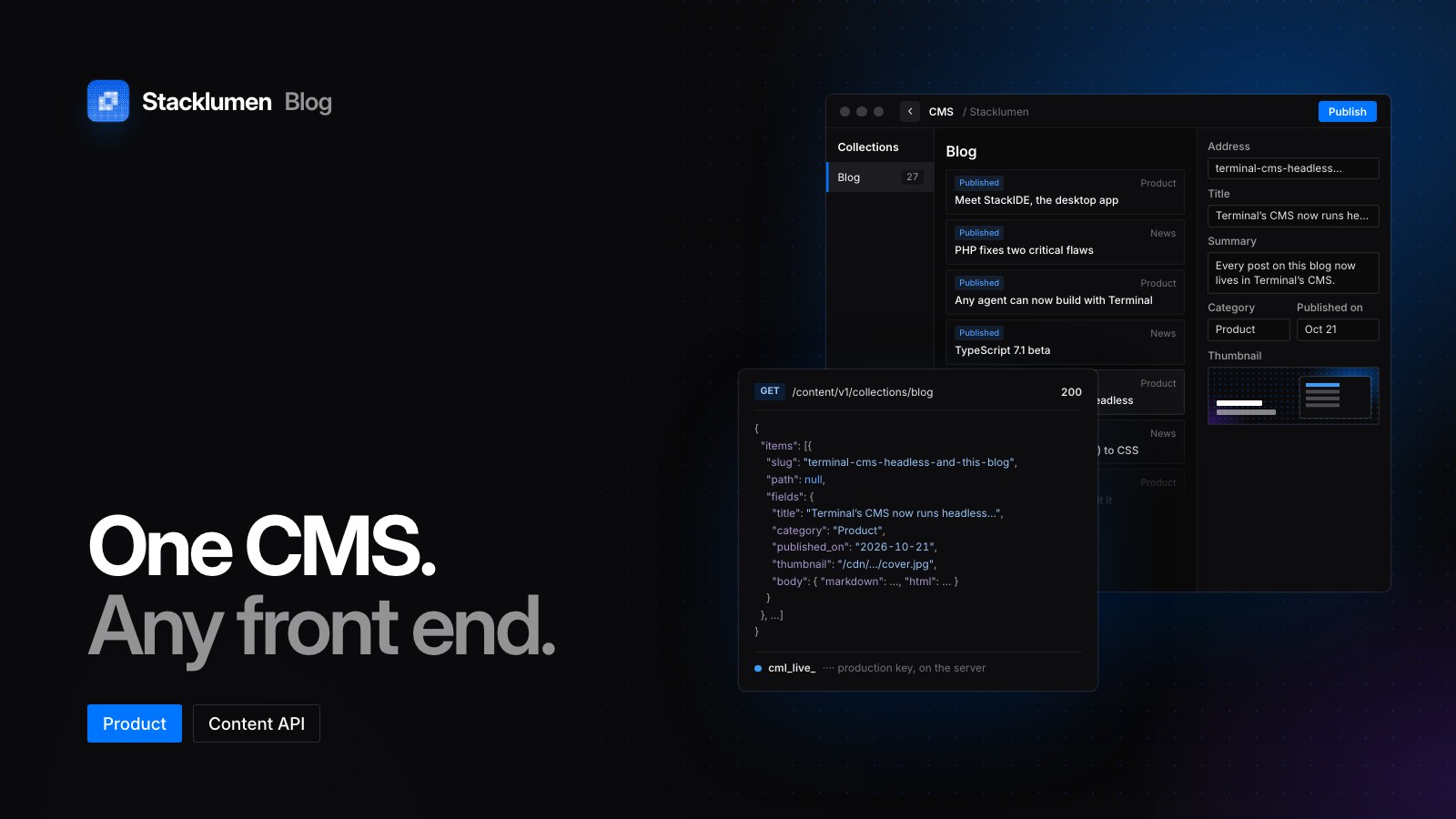
On this page
Every post on this blog, old and new, now lives in a blog collection in Terminal's CMS, with its covers in that site's assets. The blog reads them through the Content API, the same read-only API your own code can call. That makes Terminal's CMS headless as well as visual: editors work in Terminal, and a front end built and hosted anywhere else reads the content as typed JSON. It matters to agencies and in-house teams whose developers want their own framework and whose editors want a CMS they can use without a developer.
How this blog reads its posts
The blog's server asks for the blog collection with a production content key, one that starts cml_live_. The key is kept in the server's environment as STACKLUMEN_CONTENT_KEY and read when a request comes in, so it never reaches a browser.
The pages render on request, and each server instance keeps what it read for five minutes. When we publish an edit in the CMS, it shows on the blog within about five minutes, with no deploy and no rebuild. If a read fails after an earlier one worked, the blog keeps serving the posts it last read.
This post is an item in that collection too, with its body in a rich text field.
Published items, drafts and two kinds of key
CMS edits wait for a publish. Every item says where it stands: Draft, New, Published or Changed. Publishing the site publishes every new and changed item, and Publish item puts one live on its own. An item with an empty required field, or a value a unique field already holds, is saved but held back at publish until it is fixed.
The key decides which copy a reader gets:
- Production keys (
cml_live_…) serve published items only, as they were last published. Their responses are cached for 30 seconds. - Development keys (
cml_test_…) serve every item as it is being edited, drafts included, each labelled with its status. They are never cached, which suits a preview or staging build.
A key reads one site or every site in the workspace, and it can only read. A production key keeps working if the person who made it leaves the workspace; a development key stops.
What the Content API serves
Every route sits under https://www.stacklumen.com/terminal/api/content/v1, with the key sent as a bearer token in the Authorization header.
GET /returns the site, its languages and time zone, and its collections.GET /collections/:collectionreturns items a page at a time, up to 100 a page (20 by default). Followpagination.nextfor the rest.GET /collections/:collection/items/:itemreturns one item, by its slug or id.GET /typesreturns a generated TypeScript module: a type for every collection and a small client with no dependencies, so a build step can regenerate its types holding nothing but the key.
Values arrive typed: numbers as numbers, toggles as booleans, rich text as {markdown, html}, dates and times as ISO times in UTC, lists as arrays and empty fields as null. A list takes sort, order and filter.<field>. Any read takes locale for one of the site's languages and richtext=blocks for rich text as structured blocks, and ?expand= returns referenced items in place of their ids, one level deep. A reference follows the key's own rules, so a production key never sees an unpublished item through one. Each item also says where its page is on the site.
Responses carry an ETag: send it back as If-None-Match and an unchanged response comes back empty. Each key can make 600 requests a minute.
The API sends no CORS headers, on purpose: keys belong on servers. Keep yours out of any variable your framework ships to the browser, such as those starting PUBLIC_, NEXT_PUBLIC_ or VITE_.
Our blog renders on request, so a short cache is enough. A statically built site needs to hear when content changes, and webhooks tell it: collection.item.published, collection.item.deleted and site.published. Each delivery is signed with HMAC-SHA256, and a failed delivery is retried for up to 72 hours.
One CMS for Terminal pages and your own code
A headless front end reads the same collections that fill pages built in Terminal, and a site published from Terminal needs no key at all: its pages already carry their collections. One picker binds any part of an element to an item's fields, template pages give each item a page of its own, and an empty field publishes blank rather than the design's placeholder. When content moves over from an older system, a CSV file can fill a collection in one go.
An agent connected to Terminal over MCP can do the headless setup in your repository. get_content_api returns the routes, the collections and the same TypeScript, create_content_key makes a key and shows it once, and create_webhook registers the rebuild hook. These tools need the Keys and webhooks permission, which full access never includes; an agent asks for it when it signs in.
Where to find it
- In Terminal, open a site, then Content → Content API for the address, its keys and a quick start filled in with that site's own collections. Content keys can also be made on Agents & API.
- The base URL is
https://www.stacklumen.com/terminal/api/content/v1. - The docs cover the Content API and collections in full.
- Each release is on the changelog.