Google explains every control you have over its AI features
Google's Search documentation now sets out, in one place, how to control whether your content is used in AI Overviews, AI Mode and AI training, and how those features choose which pages to cite.

On this page
On 24 November 2026, Google added two pages to its Search Central documentation. One explains every control a site owner has over how Google's generative AI uses their content. The other explains how AI Overviews and AI Mode choose which pages to cite. Most of the controls already existed. What is new is that they are described side by side, with what each one does and does not affect.
Google added a new ranking section to its documentation on the same day.
Two uses of your content
Google's page separates two things that are easy to mix up.
- Training. Foundation models such as Gemini learn general patterns from data before they are released. Google says training feeds both the Gemini app and the generative AI features in Search.
- Grounding. When a model answers a question, it can look up fresh information in the Search index. Google says grounding happens after a model has been trained and deployed, and is separate from training.
Each control reaches one or both of these, and some reach neither.
The controls, one by one
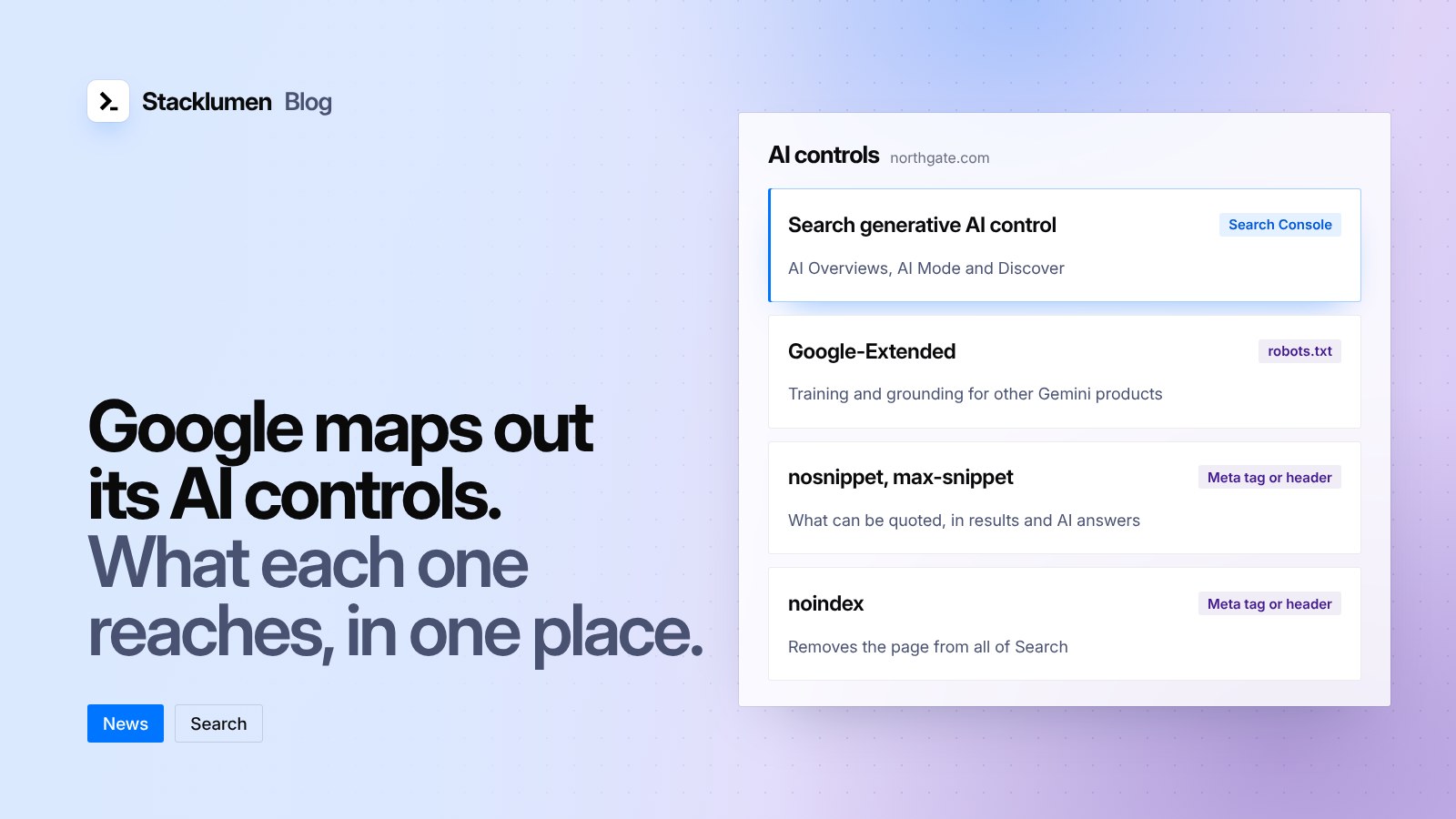
- The Search generative AI control in Search Console. This setting governs whether your content and links are used and shown in generative AI features in Search and Discover, such as AI Overviews and AI Mode. Google says it does not affect model training.
Google-Extendedin robots.txt. This limits the use of your content to train and ground certain commercial generative AI products. Google says it is not a ranking signal and does not affect whether your site appears in Search.GoogleOtherin robots.txt. This blocks Google's generic crawler, which is used for things outside Search such as one-off research crawls. It does not affect Search.- Robots meta tags,
data-nosnippetand theX-Robots-Tagheader. Thenosnippet,data-nosnippetandmax-snippetrules control snippets and previews, and they apply in AI Overviews and AI Mode too. Google saysnosnippetandmax-snippetcan also stop content being used as a direct input to those features. noindex. This keeps a page out of Search entirely, including its generative AI features. It is the only one of these controls that removes a page from Search.
The page also repeats a plan Google announced earlier: it intends to support the shared training preference token, __usage_ai-training, in robots.txt in early 2027.
Common combinations
Google lists the settings for several common choices:
- Take part in everything: do not disallow
Google-Extended, and do not exclude your site with the Search Console control. - Stay in Search and allow training, but stay out of AI Overviews and AI Mode: exclude your content with the Search Console control, and leave
Google-Extendedalone. - Stay in Search, including AI Overviews and AI Mode, but limit training and grounding elsewhere: disallow
Google-Extended. - Stay out of both: use the Search Console control and disallow
Google-Extended. - Keep a passage out, or limit how much is quoted: use
data-nosnippet,nosnippetormax-snippet.
For paywalled content, Google points to paywalled structured data together with data-nosnippet or max-snippet.
How AI Overviews and AI Mode pick sources
The second page describes four steps. The features use a customised Gemini model connected to Google's ranking and quality systems. They start from relevant results in the Search index, may run related searches to cover different parts of a question (Google calls this "query fan-out"), write a response grounded in those results, and then cite pages that support it. Links appear as inline icons, grouped cards or carousels.
To be eligible, a page must be indexed, able to appear in Search with a snippet, and meet Google's technical requirements, and the site must be included in Search generative AI features in Search Console.
Google's advice for site owners is practical: keep key information in text, show where facts come from and who is behind the site, fix factual errors, and only change a page's date when its content has changed substantially. The Generative AI performance report in Search Console shows how your pages appear in these features. If a response gets something wrong because of your page, Google suggests updating the page and requesting a recrawl.
The new ranking section
The ranking section collects Google's ranking principles, how it announces ranking updates, and how to send feedback about them. Google says it ranks results by usefulness to the query, does not accept payment to boost pages in organic results, and announces policy changes and significant ranking updates in advance through its Search Status Dashboard.
What it means for your site
- Decide what you want first. Being cited in AI Overviews, being used for training, and appearing in Search are now three separate choices with separate controls.
- Check your Search Console setting. If you or a previous agency changed the Search generative AI control, your pages may not be eligible to be cited in AI Overviews or AI Mode.
- Read your robots.txt. Look for
Google-ExtendedandGoogleOthergroups and confirm they say what you intend. - Use
noindexwith care. It removes a page from all of Search, not only from AI features. To limit what is quoted, use the snippet rules instead. - Keep pages accurate and dated honestly. Google says these features cite pages that support the answer, and its advice centres on clear, current, sourced content.