Cloudflare's Search for Agents gives sites a search endpoint for AI agents
Cloudflare has launched Search for Agents, a per-domain setting that indexes a site and answers AI agents' searches at /.well-known/search. Here is how it works and what to check before you turn it on.

On this page
Cloudflare has launched Search for Agents, a setting that makes a website searchable by AI agents. It was announced on 25 November 2026. When a site owner turns it on, Cloudflare crawls and indexes the site, then answers searches from agents at a fixed address on the site's own domain.
The idea is that an agent looking for something on your site can ask one search endpoint instead of crawling page after page.
How it works
Search for Agents is a per-domain setting. In the Cloudflare dashboard it sits under Quick Actions on the domain's Overview page, and it can also be turned on through the API. The domain must already be set up in your Cloudflare account.
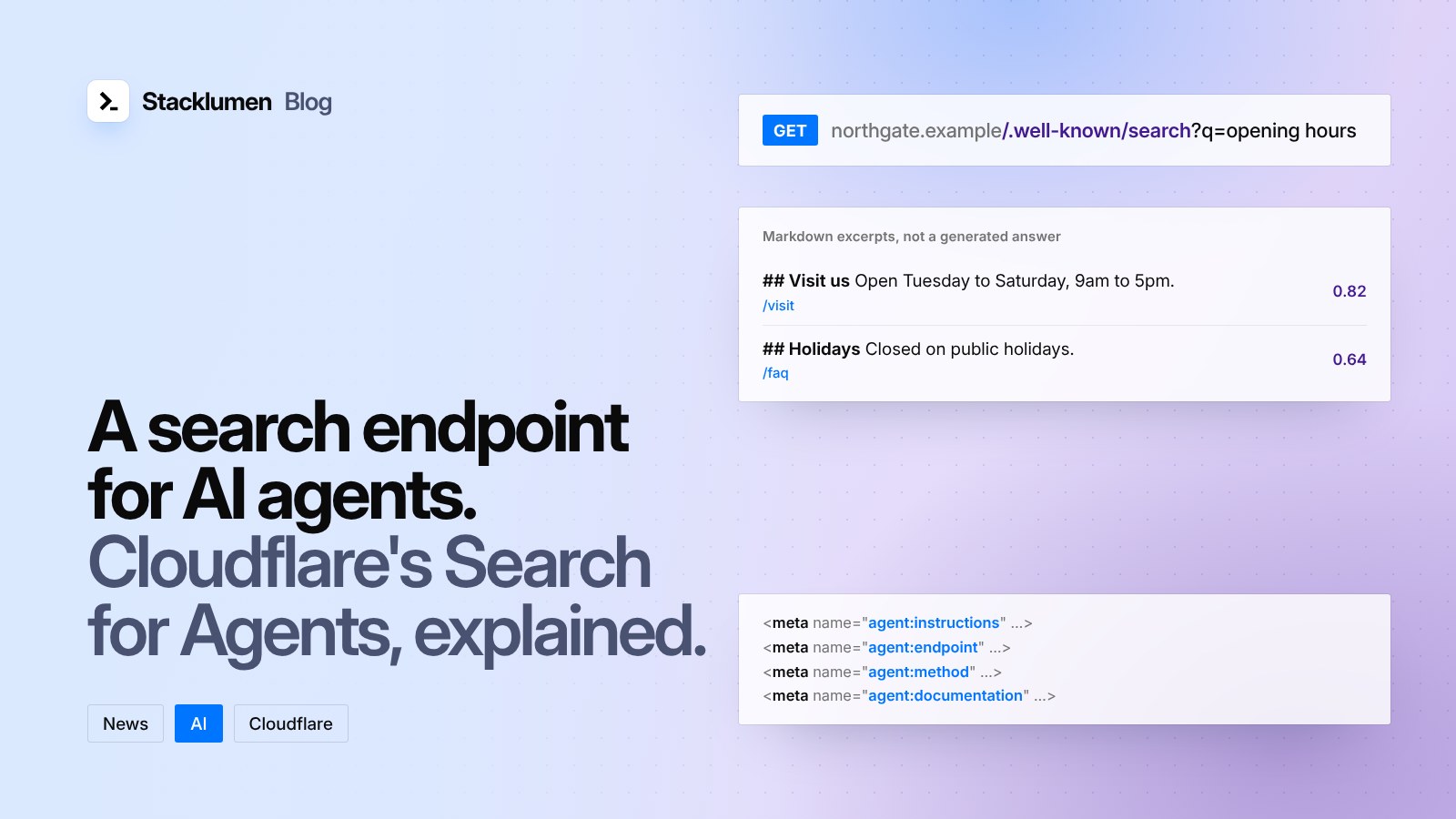
When you turn it on, Cloudflare creates an AI Search instance for the domain, named search-for-agents-<ZONE_ID>, and starts crawling and indexing your content. Searches are then answered at:
https://your-domain/.well-known/search
Agents can search it in two ways:
- GET, with the search text in a
qparameter, for example/.well-known/search?q=opening+hours. The text can be keywords or a question. - QUERY, a newer HTTP method, with the search text sent as a plain-text body or as JSON with a
qfield.
The endpoint returns Markdown excerpts from your own pages, with source references and relevance scores. Cloudflare is clear that it returns retrieved content, not a generated answer. Nothing is written for you; agents get your words and links back to your pages.
How agents find it
Cloudflare adds four meta tags to the <head> of your HTML pages: agent:instructions, agent:endpoint, agent:method and agent:documentation. These tell an agent that the endpoint exists and how to use it. If you also use Cloudflare's Markdown for Agents feature, requests that ask for Markdown get the same details as front matter at the top of the page.
The default settings
Cloudflare's documentation lists the defaults a new instance starts with:
- It crawls up to 100,000 pages, subject to instance limits.
- It follows links up to five hops from the starting address.
- It recrawls and syncs every 24 hours.
- It returns at most 10 chunks of content per search.
- Subdomains are left out.
- Query rewriting and reranking are off.
Reranking and cache settings can be changed afterwards. Cloudflare also offers a public REST API, an MCP endpoint and a search widget for human visitors on the same index.
The crawler reads your XML sitemaps by default, and a "Discover" mode can also follow links it finds. You can include or exclude paths with patterns. Cloudflare's own example indexes **/blog/** but skips **/blog/drafts/**.
Access and cost
Searches are still subject to your domain's settings, including bot management, AI Crawl Control and WAF rules. Cloudflare's documentation advises that only content you intend to be publicly searchable should be indexed.
Cloudflare says the feature is available to all customers, including those on the Free plan, with limits. Its documentation describes it as a beta. Usage is billed as AI Search usage: content ingestion, index storage and queries, with included usage and limits on the Workers Free and Paid plans. Cloudflare publishes the details on its AI Search limits and pricing page.
What it means for your site
- It is opt-in. Nothing changes for a site behind Cloudflare unless someone turns it on. If your domain is managed by someone else, ask them before they do.
- Decide what agents should see. Anything that is crawlable and inside the included paths can end up in the index. Use exclude patterns for drafts, staging pages, thank-you pages and anything else you would not want quoted.
- Keep your sitemap honest. The crawler reads sitemaps by default, so a sitemap that lists old or private pages will feed them in. Remove pages you no longer want found.
- Write pages that read well in pieces. Agents get excerpts, not whole pages. Clear headings, plain answers near the top of a section and accurate opening hours, prices and contact details make those excerpts useful.
- Watch the bill and the limits. Check AI Search's included usage for your plan before turning it on for a large or busy site.
- Check your security rules still fit. Your WAF and bot settings apply to the endpoint, so a rule that blocks agents will block searches too.