Chrome 158 turns off XSLT on 17 November
From Chrome 158, XSL stylesheets on feeds, sitemaps and other XML pages stop working for most users. Here is the timeline, how to check your site, and the ways forward.

On this page
Chrome 158 reaches the stable channel on 17 November 2026, and from that release Chrome stops running XSLT for most users. XSLT is the old language for turning an XML file into a page a person can read. Few sites still use it in the browser, but the ones that do tend to be the places nobody looks at often: a styled RSS feed, a readable sitemap, or the admin screen of a piece of hardware. Here is what changes, from Google's own deprecation page.
What is being removed
Chrome is removing two things:
- The
XSLTProcessorJavaScript API, which runs a transformation from script. - The XSLT processing instruction, the line at the top of an XML file that looks like
<?xml-stylesheet type="text/xsl" href="feed.xsl"?>and tells the browser to restyle the file with an XSL stylesheet.
XML itself is not going anywhere. Google says plainly that it won't be removing XML from the browser, only XSLT. A <?xml-stylesheet?> line with type="text/css", which applies ordinary CSS to raw XML, also keeps working.
Why Chrome is doing it
Google gives two reasons. The libraries behind XSLT, such as libxslt, are old C and C++ code with a history of memory-safety vulnerabilities. And very few pages use it: Google puts client-side XSLT at about 0.02% of page loads. Its page says the security risk of keeping the feature "far outweighs its limited modern utility". It also notes that Firefox and WebKit have indicated plans to remove XSLT too, so this is not a Chrome-only change in the long run.
The timeline
The removal has been staged over a year:
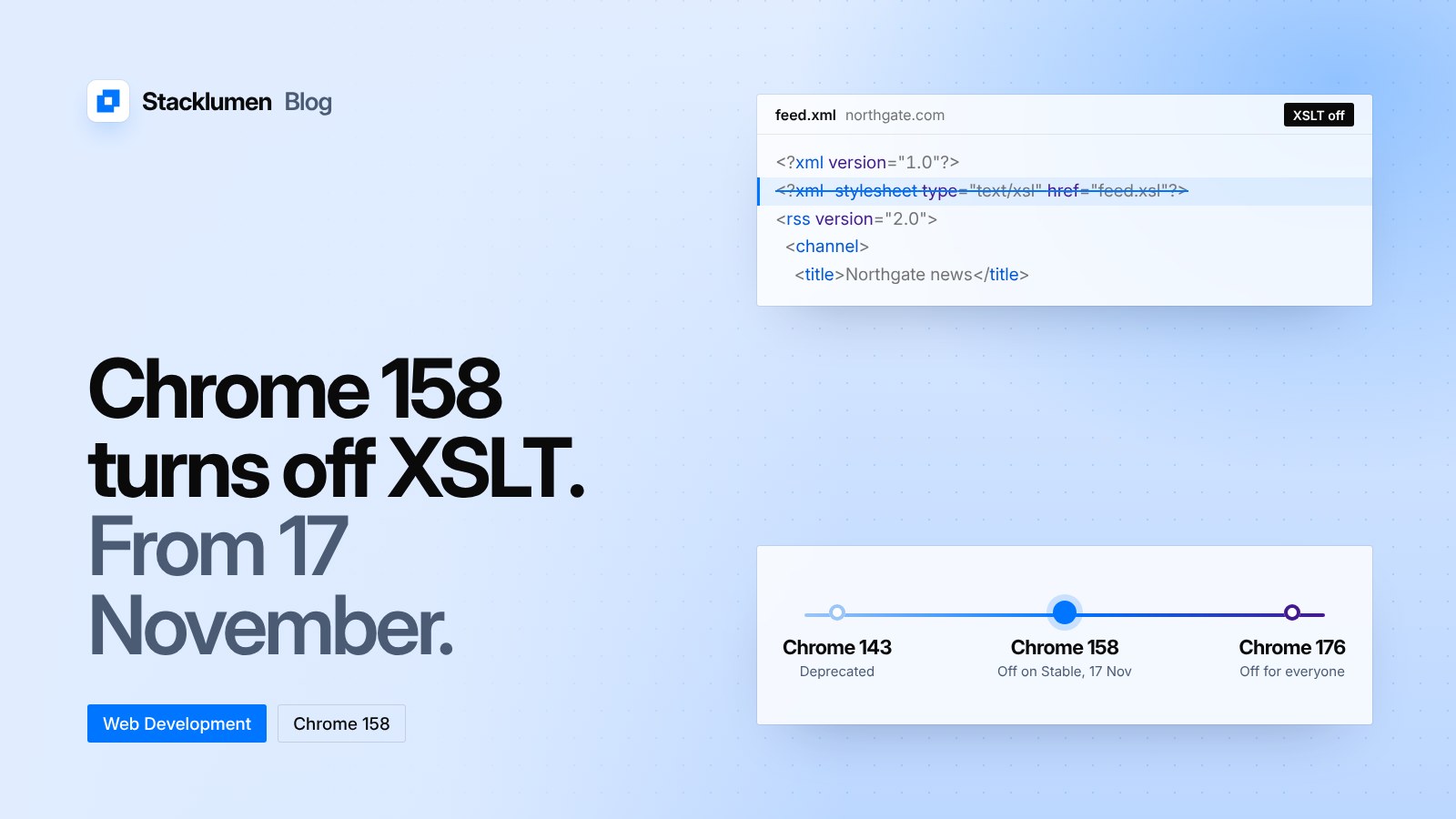
- Chrome 143 (2 December 2025): XSLT was officially deprecated, with warnings in the browser console and in Lighthouse.
- Chrome 146 (10 March 2026): an enterprise policy,
XSLTEnabled, became available for testing. - Chrome 152 (25 August 2026): an origin trial opened, so a site can keep XSLT for a while after removal.
- Chrome 158 (17 November 2026): XSLT stops working on Stable for everyone except sites in the origin trial and browsers under the enterprise policy.
- Chrome 176 (17 August 2027): the origin trial and the policy end, and XSLT is off for all users.
Chrome 158 has been in beta since 28 October, so anyone on the Beta channel can already see how their pages behave.
What you will see if you rely on it
When XSLT is disabled, a page that depended on it no longer gets its transformation. Google says Chrome shows a banner on such pages that links to an extension search, where a user can find an XSLT polyfill extension. Your visitors should not have to do that, so the fix belongs on your side.
How to find out if you use it
Google suggests two ways to check:
- Use the Reporting API. A
ReportingObserveron your pages receives a report whosebody.idis"XSLT"when the feature is used. - If you manage Chrome for an organisation, the enterprise Legacy Technology Report lists sites that still use it.
A quicker manual check is to search your site's files for text/xsl and XSLTProcessor, and to open your feed and sitemap addresses in Chrome Beta.
The ways forward
Google lists options by use case:
- RSS and Atom feeds. Add a
<link rel="alternate" type="application/rss+xml">tag to your HTML pages instead of linking people to the raw XML. Or, if you want the feed to keep its styled look, add Google's polyfill script as a direct child of the feed's root element. - Client-side templating. Add the polyfill, move the transformation to the server, or, over time, move to JSON and a JavaScript renderer.
- Embedded devices. If a router or printer serves its admin pages through XSLT and its firmware can be updated, Google suggests JSON and client-side rendering. If it can't, the browser extension is likely the best option.
- Short-term breathing room. The origin trial and the
XSLTEnabledpolicy keep XSLT running until Chrome 176, but they are a bridge, not a fix.
The polyfill is WebAssembly-based, replaces XSLTProcessor, and loads with a single <script> tag.
What it means for your site
- If your feed or sitemap uses an XSL stylesheet to look nice in a browser, it loses that styling in Chrome from 17 November, and Chrome shows its banner instead. The XML file itself still loads.
- Open each feed and sitemap address in Chrome Beta now. If it looks wrong, either add the polyfill or stop linking people to the raw file and point them to an HTML page instead.
- Search your codebase for
XSLTProcessorandtext/xsl. If neither appears, nothing changes for you. - If a client depends on XSLT and can't move this week, enrol the site in the origin trial and plan the real fix before August 2027.