Angular 20 support ends on 28 November: plan your update
Angular 20 leaves long-term support on 28 November 2026. Here is what the support table says, how to update one major version at a time, and what to check first.

On this page
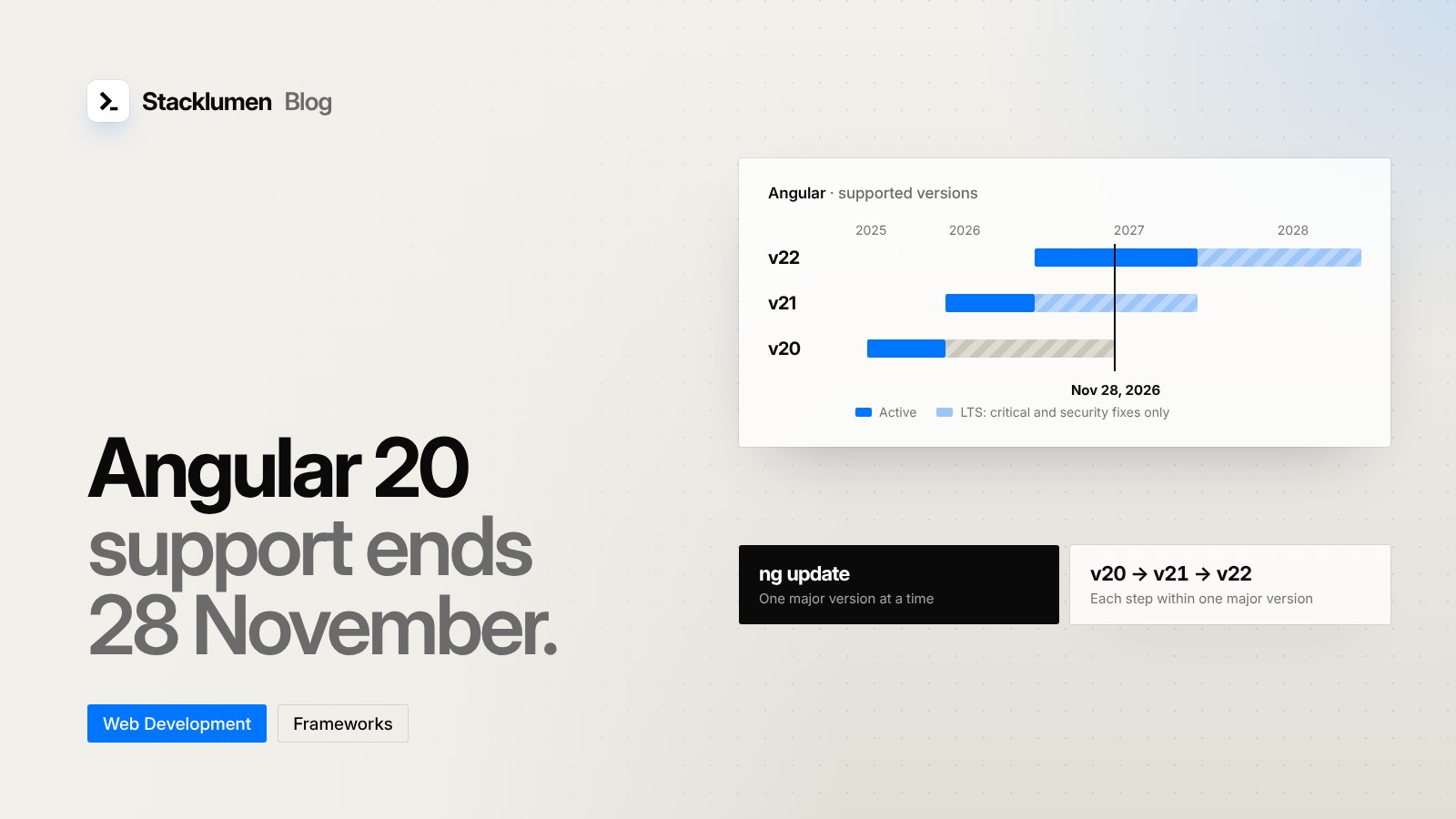
Angular 20 reaches the end of its long-term support on 28 November 2026. That is the last date in its support window on Angular's releases page. If you or a client run a site or app on Angular 20, now is the time to plan the move to version 21 or 22.
What the support table says
Angular publishes its support windows on its releases page. As of today, three major versions are supported:
- Angular 22: active. Released on 3 June 2026. Active support runs until June 2027, and long-term support until June 2028.
- Angular 21: long-term support. Released on 19 November 2025. Long-term support runs until June 2027.
- Angular 20: long-term support. Released on 28 May 2025. Long-term support ends on 28 November 2026.
The same page states that versions 2 to 19 are no longer supported.
What long-term support covered
Angular splits each major version's life into two stages. During the active stage, regular updates and patches ship. During long-term support, only critical fixes and security patches ship.
The releases page says a fix is considered for a long-term support version if it resolves a newly identified security vulnerability, or a regression since the start of long-term support caused by a third-party change, such as a new browser version.
Once Angular 20 leaves that list, neither kind of fix is promised for it.
The schedule has changed
The releases page also notes a change in rhythm. From version 22, Angular aims for one major release every 12 months, with four to six minor releases for each major. Before version 22, a major release came every six months.
Major releases are typically supported for 24 months: 12 months active, then 12 months of long-term support. The page lists approximate dates for what comes next: version 22.3 around November 2026, 22.4 around January 2027, 22.5 around March 2027 and version 23 around June 2027. Angular says these dates are general guidance and subject to change.
How to update
Angular's guidance on updating is short and specific. If you are moving across several major versions, update one major version at a time. So a project on Angular 20 goes to 21 first, then to 22.
The ng update command does the work. According to the releases page, it needs two conditions: the version you update to is supported, and the version you update from is within one major version of it.
The CLI reference describes a few options worth knowing:
--create-commitscreates source control commits for updates and migrations, so each step is easy to review.--allow-dirtylets the update run with modified or untracked files. It is off by default, which is a sensible guard.--migrate-onlyruns a migration without changing the installed version.
Angular's update guide gives step-by-step instructions for each pair of versions. Pick your current and target version there before you start.
Check your toolchain first
Each Angular version supports a specific range of Node.js and TypeScript versions. The version compatibility page lists them:
- Angular 21 supports Node.js
^20.19.0,^22.12.0or^24.0.0, and TypeScript from 5.9 up to but not including 6.0. - Angular 22 supports Node.js
^22.22.3,^24.15.0or^26.0.0, and TypeScript from 6.0 up to but not including 6.1.
That means the step from 21 to 22 can also require a newer Node.js and a newer TypeScript. Check your build server, your hosting and any CI images before you start that step.
Browser support moves too. Angular defines it using the "widely available" Baseline at a fixed date for each major version: 30 April 2025 for version 20, 20 October 2025 for 21 and 7 May 2026 for 22.
What it means for your site
- Find out what you run. Check
package.jsonfor the version of@angular/corein each project you maintain, including older client builds. - Plan two steps if you are on 20. Go to 21, test, then go to 22. Version 21 is supported until June 2027, so it is a safe place to pause, but not a place to stay.
- Update Node.js and TypeScript with the move to 22. Match the ranges on the compatibility page.
- Use one commit per step.
ng update --create-commitskeeps each migration reviewable and easy to roll back. - Tell clients early. If a client site runs on Angular 20, explain that security fixes for that version are no longer promised after 28 November, and schedule the update.