.NET 11 is out, and .NET 8 and 9 support has ended
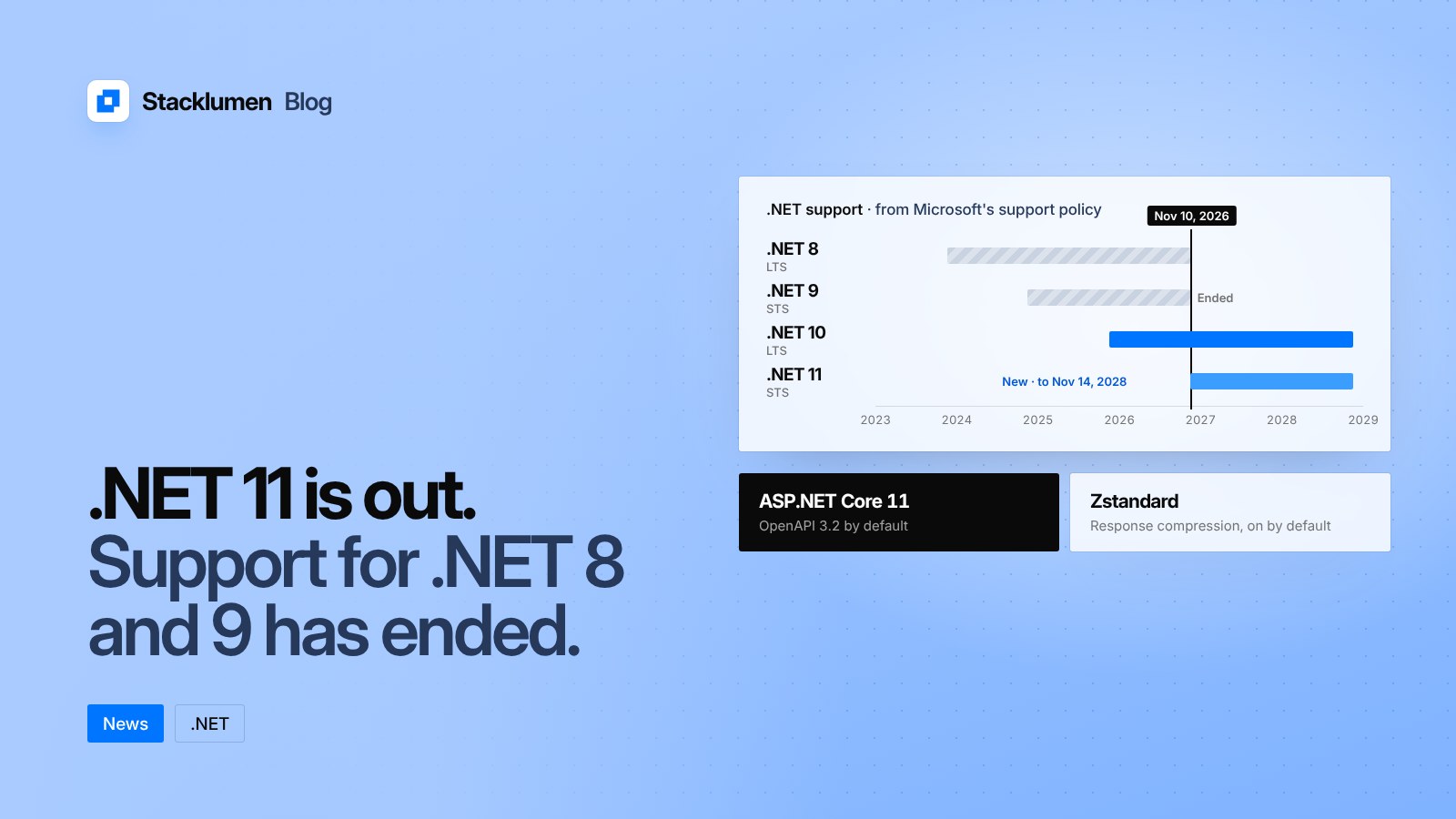
Microsoft released .NET 11 on 10 November 2026, with new ASP.NET Core features such as OpenAPI 3.2 by default and Zstandard compression. The same day, .NET 8 and .NET 9 stopped getting security fixes.

On this page
Microsoft released .NET 11 on 10 November 2026. On the same day, .NET 8 and .NET 9 reached the end of their support. If you build or host websites and APIs with ASP.NET Core, both facts matter: one brings new features, the other means older sites stop getting security fixes.
Here is what changed, from Microsoft's own announcement, support policy and release notes.
.NET 8 and 9 are no longer supported
Microsoft's support policy lists 10 November 2026 as the end of support for both .NET 8 and .NET 9. Their last patches were 8.0.34 and 9.0.23, released that day. From now on, any new security flaw found in those versions will not be fixed by Microsoft.
Two versions are now supported:
- .NET 10, a Long Term Support (LTS) release from November 2025, supported until 14 November 2028.
- .NET 11, a Standard Term Support (STS) release from November 2026, also supported until 14 November 2028.
Microsoft says STS and LTS releases get the same quality and servicing. The difference is how long support lasts. Because .NET 11 is supported for two years, it ends on the same day as .NET 10.
What is new for web apps
The ASP.NET Core 11 release notes list many changes. These are the ones most likely to affect a typical website or API.
- OpenAPI 3.2 by default. Generated OpenAPI documents now target version 3.2. Microsoft notes that this comes with breaking changes in the underlying OpenAPI library. If a tool that reads your API description does not support 3.2 yet, you can set the version back to 3.1.
- Asynchronous validation. Validation rules can now wait on work such as a database lookup or a call to another API, without blocking a thread. This works in Minimal APIs and in Blazor forms.
- Instant validation on static forms. Blazor forms rendered on the server, without an interactive connection, now show validation errors in the browser before the form is sent. Microsoft says this is on by default for forms that include the
DataAnnotationsValidatorcomponent. - Cached page sections. A new
CacheViewcomponent stores the rendered output of part of a page during static server-side rendering, so that part does not have to be rebuilt on every request. - Zstandard compression. The response compression and request decompression middleware now support Zstandard (zstd), and Microsoft says it is enabled by default.
- Pausing idle connections. Interactive Server apps can choose to pause a visitor's live connection when their browser tab has been hidden for a while. This needs an extra package and explicit setup.
- SignalR sign-in refresh. Real-time connections can refresh their authentication when a token expires, without disconnecting.
The release notes also list behaviour changes to check before you upgrade. Among them: QuickGrid now puts paging and sorting in the page address by default, the default overscan count in Virtualize rises from 3 to 15, and the navigation menu toggle in the project template no longer uses inline JavaScript.
Language and performance
.NET 11 ships with C# 15. Its headline addition is union types, where a value can be one of a declared set of types and the compiler checks that every case is handled. ASP.NET Core supports these union types in JSON request and response bodies, and OpenAPI documents describe them with anyOf.
Microsoft also describes hundreds of runtime optimisations, improvements to the JIT compiler, and changes that reduce the overhead of SDK commands. It does not give a single overall speed figure, so test your own app before and after the upgrade.
What it means for your site
- Find out which version each site runs. Check the target framework in each project file (for example
net8.0ornet9.0) and the runtime installed on each server. - Move off .NET 8 and 9. They no longer get security fixes. Your choice is between .NET 10 and .NET 11. Both are supported until 14 November 2028, so the newer features of .NET 11 come at no cost in support time.
- Check anything that reads your API description. If you generate OpenAPI documents, confirm that client generators, gateways and documentation tools accept OpenAPI 3.2, or pin the version to 3.1 for now.
- Test compression with your hosting setup. If a proxy or CDN sits in front of your app, confirm that responses compressed with zstd are passed on correctly.
- Read the breaking changes list first. Upgrade a staging copy of the site, run your tests and look over forms, grids and navigation before you deploy.
- Plan for 2028. Whichever version you choose, put the November 2028 end date in your maintenance calendar now.