Edge 158 adds an install element and CSS for media playback
Microsoft Edge 158 lets a page offer a browser-drawn install button with the new <install> element, and adds CSS pseudo-classes such as :playing and :buffering for audio and video.

On this page
Microsoft Edge 158 was released on 19 November 2026. Its web platform release notes list a new HTML element for installing web apps, a set of CSS pseudo-classes for audio and video, and a handful of smaller CSS, SVG and network changes. Here is what is in it for people who build websites.
An install button the browser draws
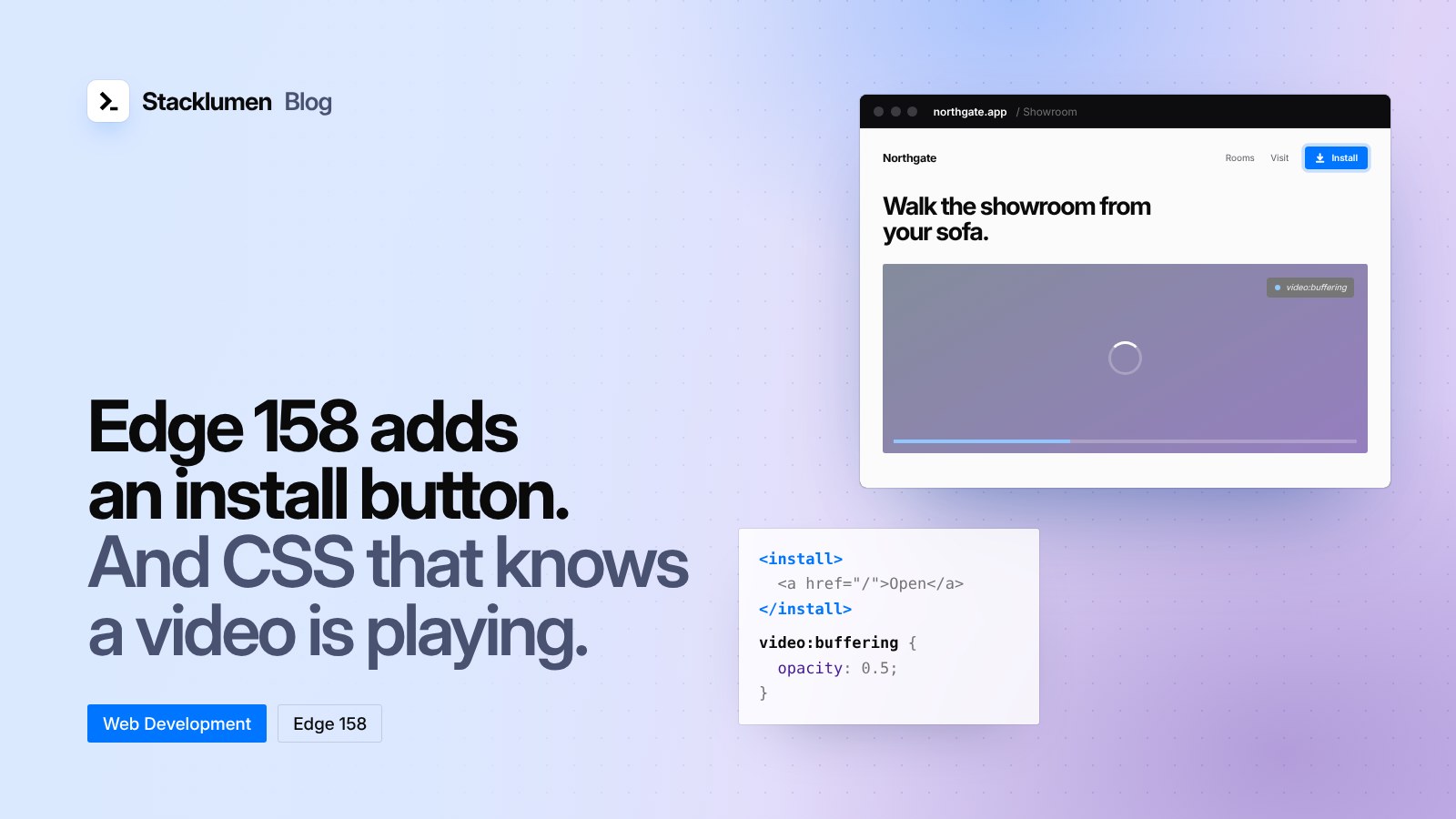
The new <install> element is a control that the browser renders itself. It lets a visitor install a web app without you writing any JavaScript. Microsoft's notes say that because the browser draws the control, it gets a stronger signal of the visitor's intent than it does when a site handles the beforeinstallprompt event.
By default the element installs the web app that belongs to the current page. To offer a different web app, for example from an app catalogue, you point it at that app's manifest with the manifest attribute, and you can add the manifest ID with manifestid. Whatever you put inside the element is fallback content, so a plain link still works in browsers that do not support it:
<install manifest="https://music.example/manifest.webmanifest" manifestid="https://music.example/app"><a href="https://music.example/">Open Music Example</a></install>
The same feature is available from script as navigator.install(), which Microsoft calls the Web Install API. It can install the current site's app, or another app by its manifest URL and an optional manifest ID. The visitor always has to confirm the install.
Organisations can switch this off. The WebAppInstallByUserEnabled policy disables web app installs by users, including ones started by the element or the method, and the web-app-installation permissions policy controls whether a site or an embedded frame may use the feature.
CSS that knows what a video is doing
Edge 158 adds seven pseudo-classes that match <audio> and <video> elements by their state:
:playingand:paused:seeking:bufferingand:stalled:mutedand:volume-locked
Until now, styling a player by its state usually meant listening for media events in JavaScript and toggling a class. With these selectors, the stylesheet can do it. The release notes give the example of dimming a video while it buffers, with video:buffering { opacity: 0.5; }. The same approach works for a custom play button that changes when the video pauses, or a mute icon that follows the player.
Other CSS and SVG changes
::highlight(*)matches every custom highlight, whatever its name. It adds no specificity, so it works as a base style that a named highlight such as::highlight(error)can override.flow-startandflow-endare new alignment keywords. They are aliases offlex-startandflex-end, and the notes say those keywords now follow the logical start and end in any layout mode where those differ from the physical directions, not only in flexbox.object-fitandobject-positionnow apply to SVG documents loaded with<object>or<embed>. Before, Edge ignored them and always stretched the SVG to fill the box.- The SVG
sideattribute on<textPath>chooses which side of a path the text follows, so text can sit inside or outside a circle without redrawing the path.
Focus, audio and WebTransport
A new permissions policy, focus-without-user-activation, lets a page stop an embedded iframe from moving focus on its own, for example with element.focus() or autofocus, unless the visitor has just interacted with that frame. Clicking and tabbing are never affected. You can set it with the Permissions-Policy header or an iframe's allow attribute, such as allow="focus-without-user-activation 'none'".
OfflineAudioContext can now render in chunks, which uses less memory on large audio jobs. WebTransport gains a reliability property, a draining promise for when a server is retiring a session, and hints for how many incoming streams to expect.
Origin trials
The notes also list origin trials, which a site must register for. They include WebMCP, which lets a site register tools for an in-browser agent to complete tasks for a visitor, an Email Verification Protocol that verifies email ownership with tokens from email providers instead of one-time codes, an Autofill event, and measurement of speculative loading through performance.speculations.
What it means for your site
- Web apps can offer a proper install button. If a site has a web app manifest,
<install>with a link inside is a low-risk way to add one, since other browsers show the fallback link. - Simplify media players. If a site's video or audio player uses script only to swap classes on play, pause or buffer, those styles can move into CSS for Edge 158 visitors. Keep the script path until other browsers you support have the same selectors.
- Review embeds. If a third-party widget steals focus when a page loads, the new permissions policy is a way to stop it.
- Check embedded SVGs. If a site loads SVG files with
<object>or<embed>and setsobject-fit, those images may now be sized differently than before.