Every Google tag is becoming a Tag Manager container
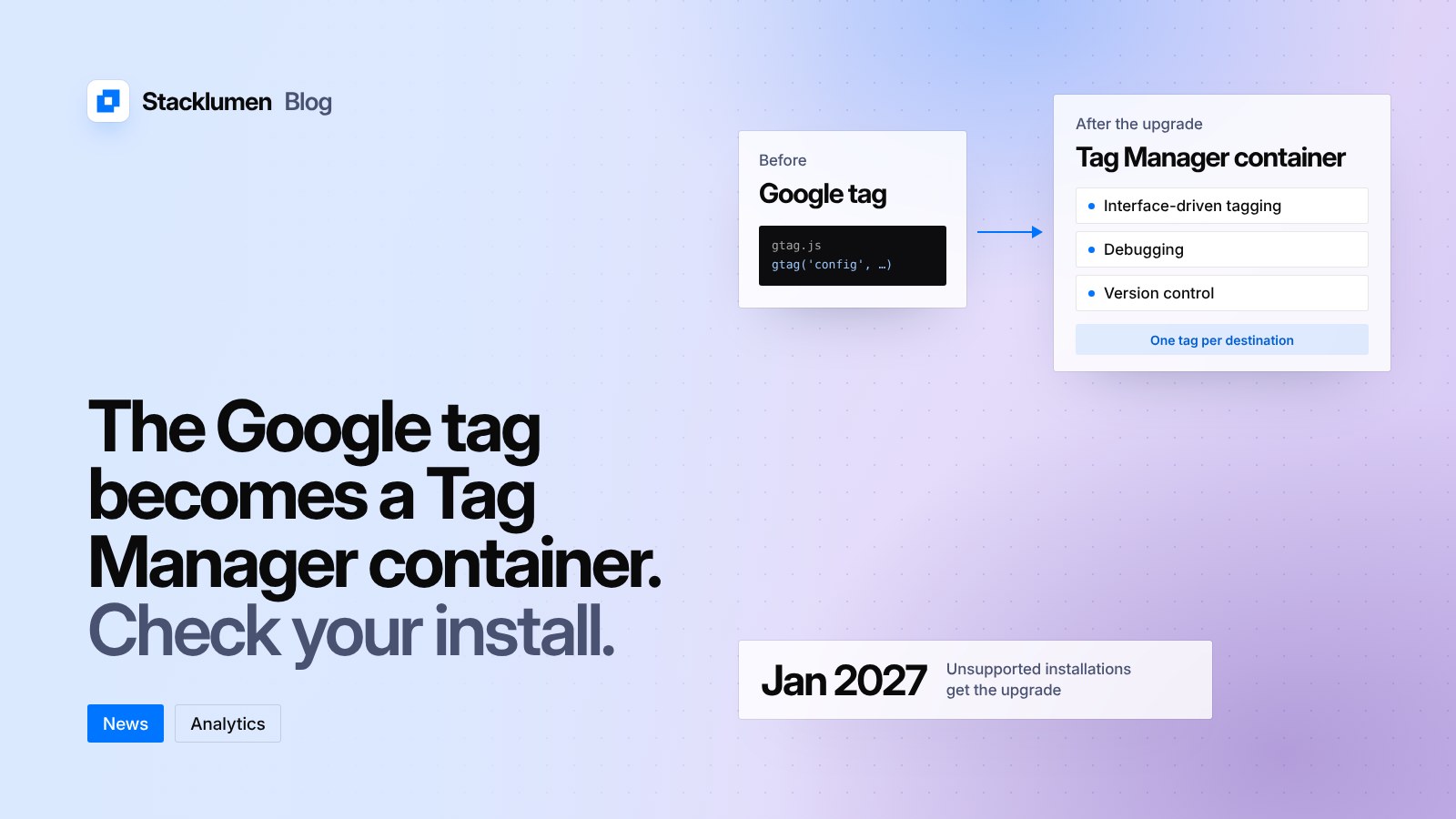
Google has merged the Google tag and Google Tag Manager. Most sites need do nothing, but unsupported installations get the upgrade in January 2027 and should be fixed before then.

On this page
Google has merged the Google tag and Google Tag Manager. In its Tag Manager release notes dated 17 November 2026, Google says that "each Google tag becomes a Tag Manager container". If your site measures visitors with Google Analytics or tracks conversions for Google Ads, this affects the code on your pages.
Most sites need to do nothing. Sites that load a Google tag in a way Google calls unsupported have until January 2027 to fix it.
What is changing
The Google tag (gtag.js) is the snippet that sends data to Google Analytics, Google Ads and other Google products. Tag Manager is the tool for managing many tags from one container without editing the site's code each time. Until now they were two separate setups.
According to the release notes:
- Every Google tag gets the capabilities of a Tag Manager container. A site that uses only the Google tag can now use Tag Manager's interface-driven tagging, debugging and version control.
- The in-page behaviour of Google tags stays the same.
- Each Google destination, such as an Analytics property or an Ads account, keeps its own tag. Google says this preserves existing setups and the triggers for automatic events.
- All new deployment snippets will be the same, and they will no longer include the gtag config command.
- To control when tags start, Google recommends the standard Tag Manager initialization triggers. The Initialization trigger can make a tag wait for the config command, which keeps older setups working.
- Access to data in Tag Assistant, Google's debugging tool, will follow the permissions people already have on the Tag Manager container.
What counts as an unsupported installation
The release notes link to a help article, "Set up your Google tag installation correctly for gtag.js". It describes the setup that is not supported: a Google tag ID that starts with G-, AW- or DC- loaded through the Tag Manager snippet (gtm.js) instead of the Google tag snippet (gtag.js), often with a gtag('config') command added beside it.
The article warns that sites using this setup "may experience unexpected changes to their tag behavior", and that Tag Manager snippets will soon stop recognising or waiting for gtag('config') commands. Google says it has emailed the owners of affected containers. The release notes say unsupported installations will receive the upgrade in January 2027, and advise changing the setup before then.
How to fix it
The help article gives these steps:
- Copy your Google tag ID from Google Ads or Google Analytics.
- Add the standard gtag.js snippet with that ID, immediately after the opening head tag on every page.
- Remove the gtm.js snippet that was loading the G-, AW- or DC- ID, and any gtag('config') command tied to it.
- If you use Tag Manager for other tags, keep its snippet with your GTM- container ID, and add the Google tag inside Tag Manager rather than in the page code.
To check the result, the article suggests Google Tag Assistant, where your tag ID should appear under "Google tags found", or the Network tab in Chrome DevTools, where requests should go to googletagmanager.com/gtag/js rather than /gtm.js.
Two related changes this autumn
The same release notes list two earlier changes that point the same way. On 8 October 2026 Google said all Tag Manager container snippets will initialise on container load, and that config commands will show in the dataLayer as gtag.config events. On 9 November 2026 it said tags that listen for "page view on history change" events will also record a page view when a page is restored from the browser's back/forward cache, matching how they already behave on other back and forward navigation. That second change can move page view counts on sites that rely on those events.
What it means for your site
- Find out how Google measurement is installed on each site you run. Look for gtm.js loading an ID that starts with G-, AW- or DC-. That is the setup Google says to change before January 2027.
- If a client's site uses a plain gtag.js snippet or a GTM- container, you do not need to act. You will be able to use Tag Manager's tools on the Google tag if you want them.
- Check the inbox for the Google account that owns each container. Google says it has emailed owners of affected setups.
- If you report on page views, note the date of the back/forward cache change, 9 November 2026, so a shift in the numbers is not mistaken for a change in traffic.
- After any change, test with Tag Assistant before and after publishing.